Right-click menus (contextMenu)
Add contextMenu when a single click isn't enough: you want a menu of several actions on one element, like drilling into one row while linking out or exporting from another.
What you can do
contextMenu.actionsis an array of at least one action mixing six kinds:filter,drill,link,copy,export, andopenOverlay.- Every action requires
typeandlabel;linkadditionally requires aurlstarting withhttps://,mailto:, ortel:, with{token}values URI-encoded. linktakestarget:taborself;copytakescopy:value(default),row, or a field name, and runs client-only.exporttakesformat:csvorjsonandscope:roworresult;openOverlayrequirestargetPageand takespresent,size, andside.- A
when: {field}clause shows an action only for datums that carry that field. - A
tablecolumn can carry its owncontextMenuwhose actions merge below the panel's;contextMenuworks on every panel type.
contextMenu is available on every panel type, including filter, filter-bar, container, and layout panels that onClick cannot use.
Spec
View spec
{
  "id": "top-customers",
  "type": "chart:bar:horizontal",
  "title": "Top customers",
  "data": {
    "query": "SELECT customer, SUM(amount) AS revenue FROM orders GROUP BY 1 ORDER BY 2 DESC LIMIT 10"
  },
  "spec": {
    "categoryField": "customer",
    "valueField": "revenue"
  },
  "contextMenu": {
    "actions": [
      {
        "type": "drill",
        "label": "Drill into {category}",
        "targetPage": "customer-detail",
        "param": "customer",
        "valueFrom": "category",
        "valueType": "string"
      },
      {
        "type": "link",
        "label": "Open in CRM",
        "url": "https://crm.example.com/accounts/{category}",
        "target": "tab"
      },
      {
        "type": "copy",
        "label": "Copy row",
        "copy": "row"
      },
      {
        "type": "export",
        "label": "Export result (CSV)",
        "format": "csv",
        "scope": "result"
      }
    ]
  }
}
The four contextMenu.actions mix a drill, an external link, a client-side copy, and a CSV export in one menu.
Try it live
Open the pipeline-control-room dashboard in the live demo
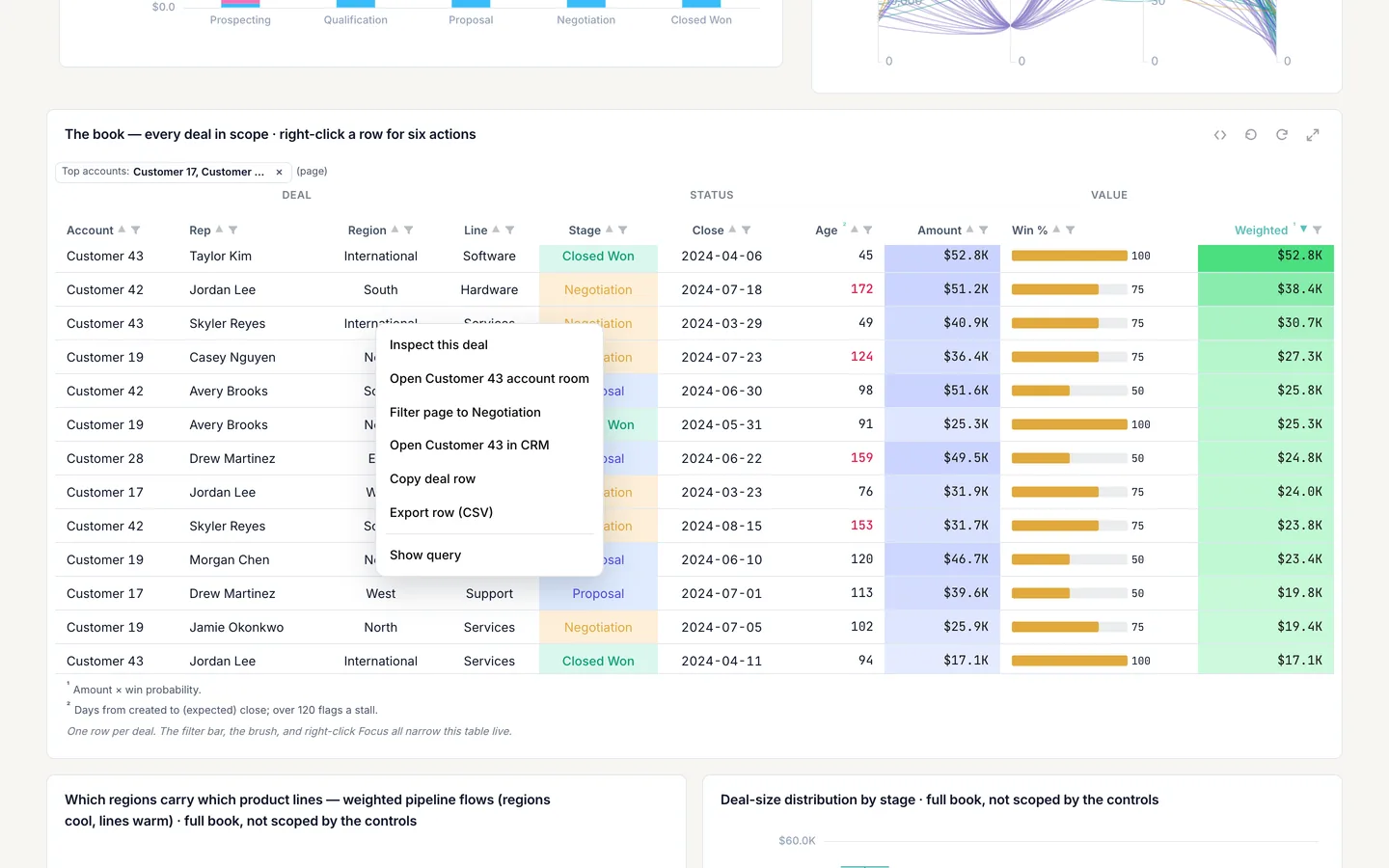
Open pipeline-control-room and right-click a row of the deals table, cr-table, to see a five-action context menu: two openOverlay actions, filter, copy, and export. The screenshot on this page uses a custom light theme, so colors will differ from the template as shipped.
Build it in dvt
Every interaction on this site is a few lines of the same declarative JSON spec. Read the full spec format, or connect an AI agent to your warehouse and build one live in the quickstart.
Follow the build
dvt is in founding research. Leave your email and we'll reach out when there's something to see — no newsletters, no noise.