How governed writes work
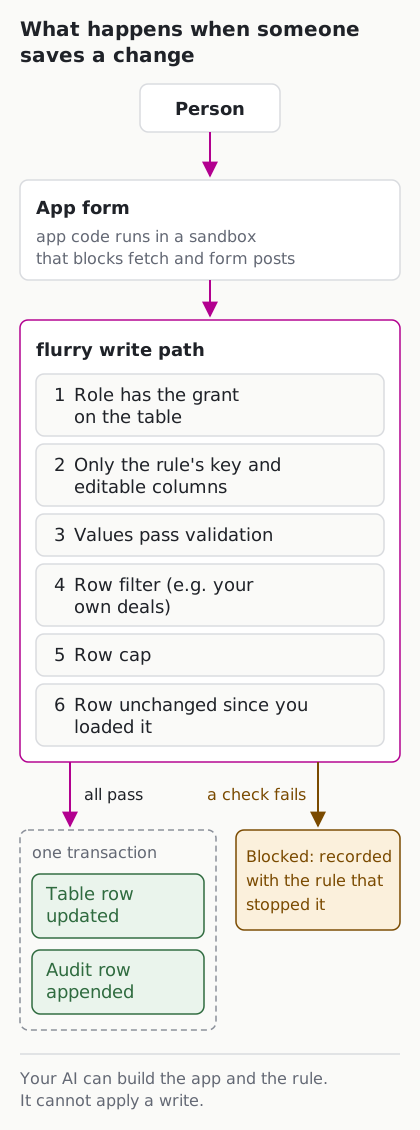
flurry apps can change data: approve a price, move a deal’s close date, triage a failed check. That is what makes them apps and not dashboards. It is also why every change goes through one path. An app never sends its own SQL to a table. It asks flurry to apply a write rule the app declared, flurry checks the rule and the person’s role, and the change and its audit row land together or not at all.
A write rule
Each rule is a small file in the app’s writes/ folder. This is the rule behind the Pipeline review app’s “update deal” form:
{
  "name": "update_deal",
  "table": "SALES.CRM.DEALS",
  "op": "update",
  "key": ["DEAL_ID"],
  "editable": ["FORECAST_CATEGORY", "NEXT_STEP", "CLOSE_DATE"],
  "validate": {
    "FORECAST_CATEGORY": { "type": "string", "enum": ["Pipeline", "Best Case", "Commit", "Omitted"] },
    "NEXT_STEP": { "type": "string", "maxLength": 500 },
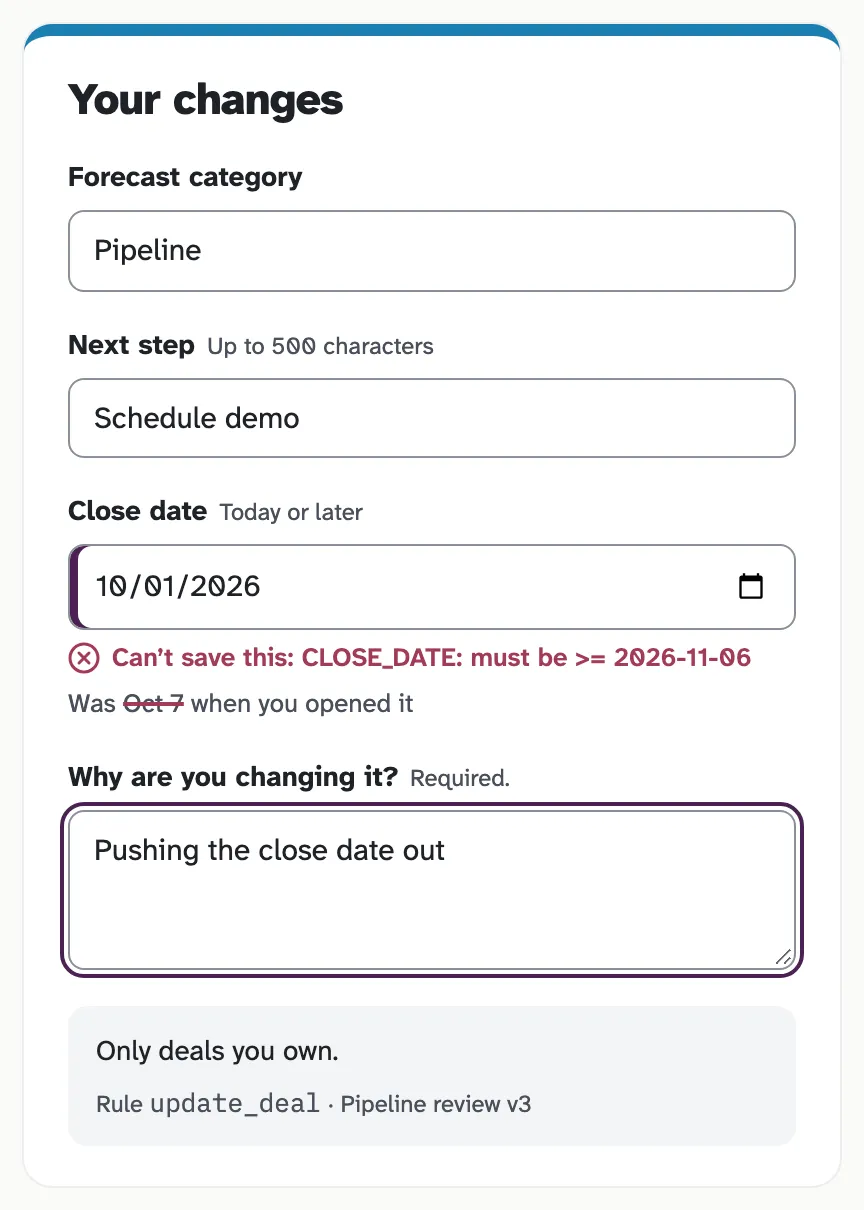
    "CLOSE_DATE": { "type": "date", "min": "today" }
  },
  "row_filter": "OWNER_EMAIL = CURRENT_USER_EMAIL()",
  "max_rows": 1
}
In plain words: a rep may change the forecast category, next step and close date of one deal at a time, only on deals they own, and the close date cannot be in the past.
| Field | What it decides |
|---|---|
table |
The one table this rule may change. It must be among the tables the app declares in app.json |
op |
insert, update or delete |
key |
The columns that identify a row |
editable |
The only columns a person may set. Everything else is read-only |
validate |
Per column: type (string, number, integer, date, boolean), allowed values, required, length, pattern, minimum and maximum. Dates can be bounded by today |
row_filter |
One condition the row must meet, using the person’s identity: CURRENT_USER_EMAIL(), CURRENT_USER() or CURRENT_ROLE(). No subqueries |
max_rows |
How many rows one change may touch. Default 1, at most 1000 |
stamp |
Optional columns flurry fills itself with the person (caller) or the time (now), so they cannot be typed in |
flurry checks every rule when the app is validated, before it can be published: the table must be declared, the rule must be listed in app.json, and every column must exist. A rule is part of the app’s files, so a change to it is a new version with a change note, and a certified app that changes a rule goes back for re-certification. See how apps are versioned.
Who may write
Two things decide whether a person’s change is allowed:
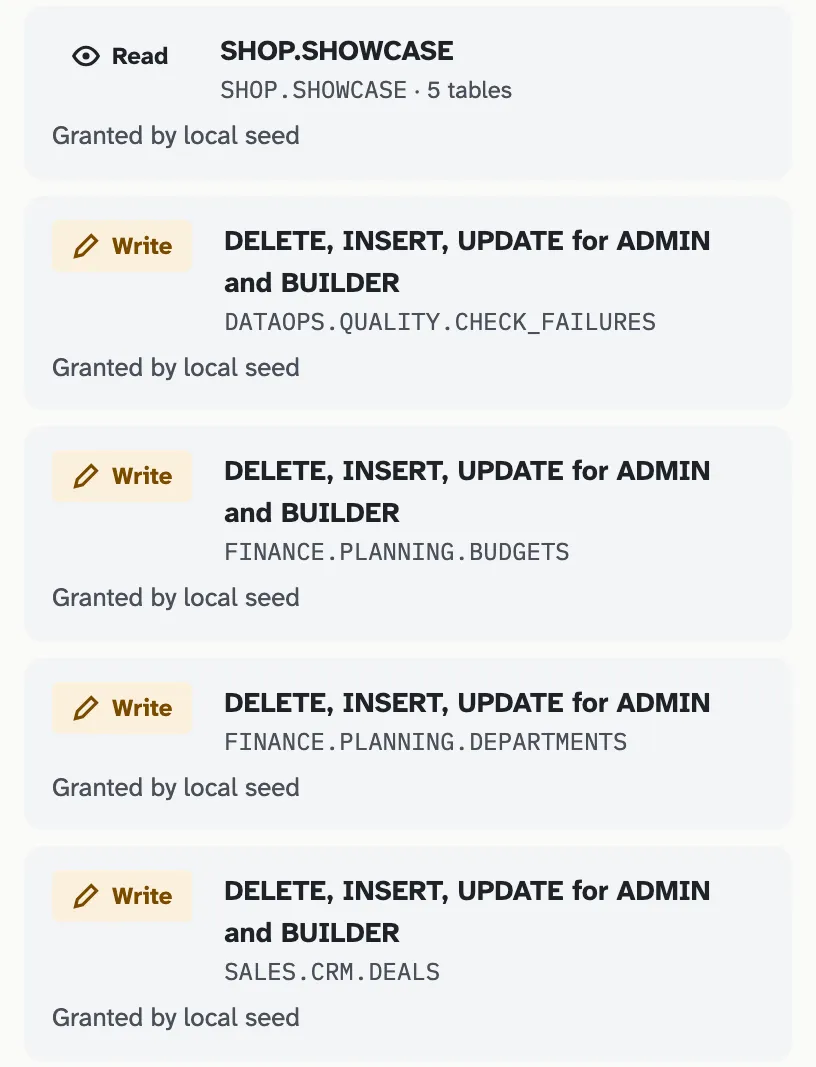
- The role’s grant on the table. A write needs read access to the table plus the privilege for the operation (insert, update or delete) for the person’s role. flurry is designed so these follow the Snowflake roles you already grant. The local sample install maps its own
ADMINandBUILDERroles. - The rule’s row filter. Even with the grant, a person can change only the rows the filter allows, such as their own deals.
flurry has three app roles: viewer uses apps, editor builds and publishes them, admin certifies, approves and manages access. Admins see what flurry can read and every table’s write grants in one place:
The checks every change passes
When someone saves a change, flurry runs these in order and stops at the first failure:
- The person’s role has the grant for this table and operation.
- The change sets only the rule’s key and editable columns.
- Every value passes the rule’s validation.
- Every row the change touches passes the row filter.
- The change touches no more rows than
max_rows. - The rows have not changed since the person loaded them. If someone else edited the deal in the meantime, the save is refused instead of silently overwriting their work.
While the change runs, the database itself allows only two things: writing the rule’s table and appending the audit row. Anything else the statement tried would be refused.
Preview before you save
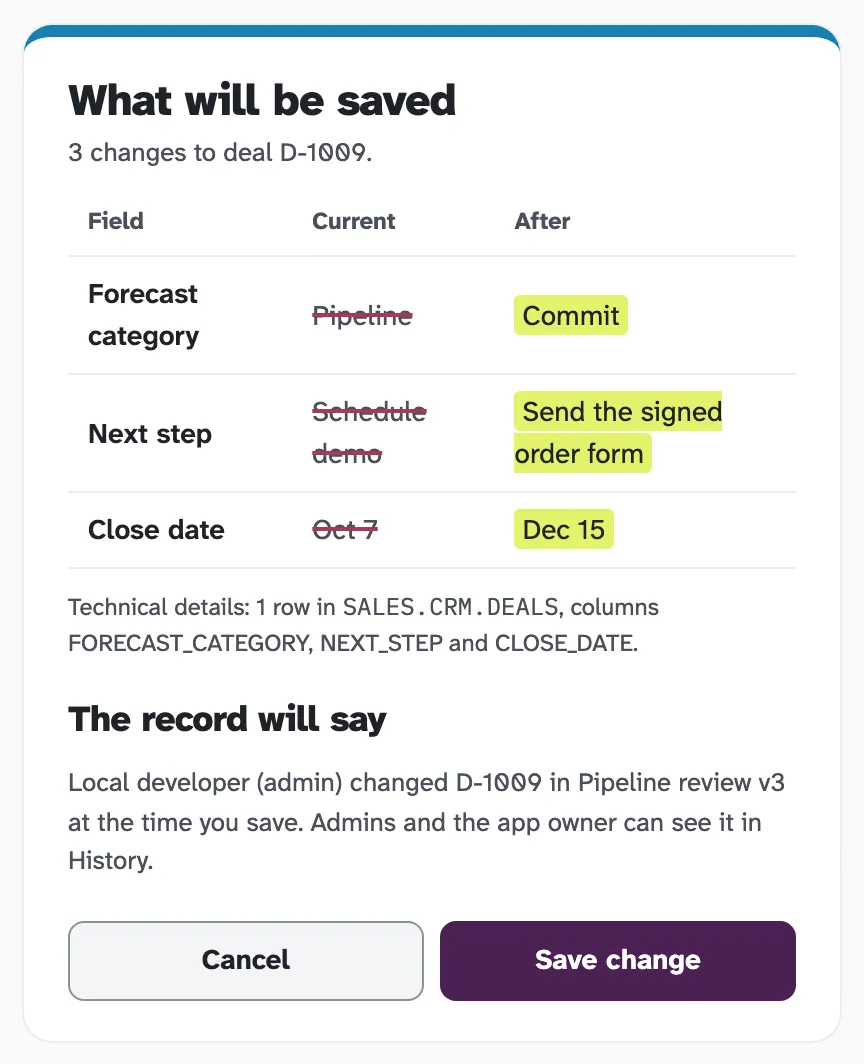
Every change can be previewed first. A preview runs the full set of checks and shows each row before and after, then rolls everything back. Nothing changes until the person saves.
The audit row
Every applied change appends exactly one audit row, in the same transaction as the change itself. If the change fails, there is no audit row; if the audit row cannot be written, there is no change. Each row records:
- who: the person and the role they acted as
- when
- which app, which version, and which rule
- the change note of that app version, so a write leads back to why the app works the way it does
- the row’s key, and its values before and after
- the reason the person typed when saving from the update form
The audit table is append-only. Updating or deleting an audit row is refused by the database.
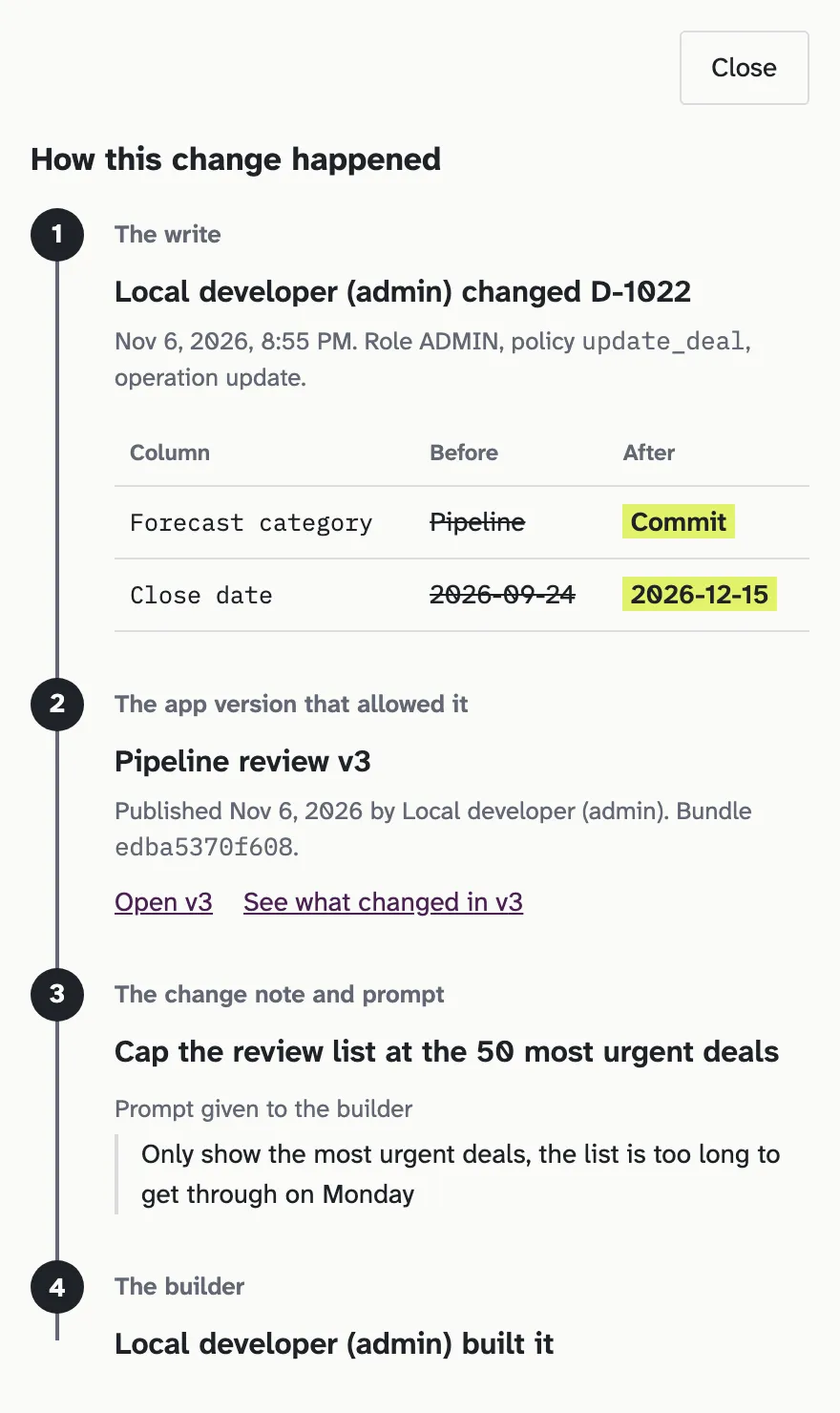
Open any change in Who changed what and flurry shows how it happened: the change, the app version it came through, that version’s change note and the request that produced it, who built it, and every earlier change to the same row. A person who cannot read the table cannot see its changes here either; to them the change does not exist.
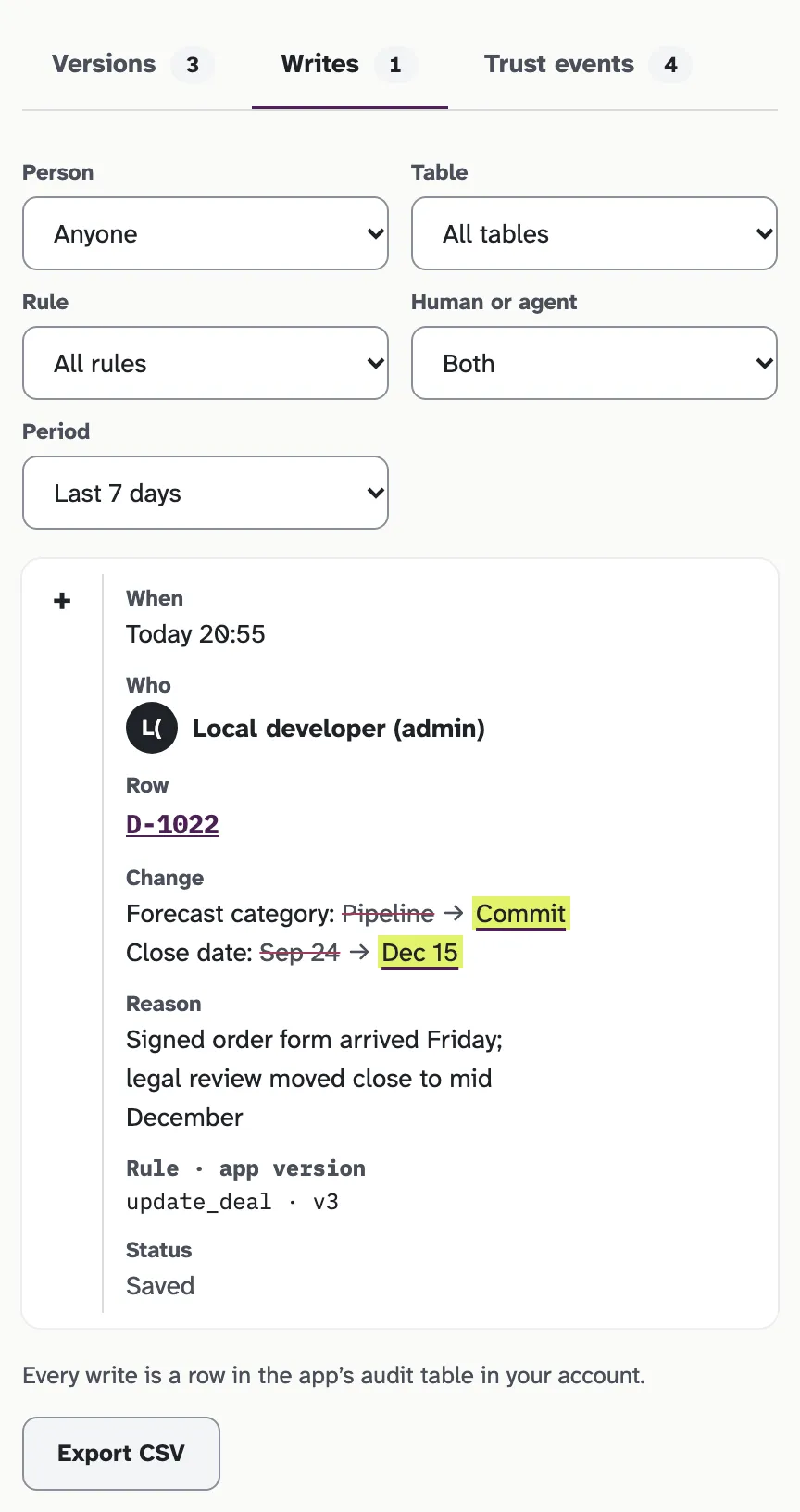
The same changes are listed per app on its History page, under Writes.
Blocked changes
A change that fails a check is refused with the reason, such as the row filter or a value out of range, and is recorded as a blocked write with the name of the rule that stopped it. Admin Access counts blocked writes per rule, so a rule that keeps stopping people stands out.
Your AI builds the rules; people make the changes
The AI you connect to flurry can write an app’s rules, preview them and publish them, each with a change note. It has no tool that applies a write. Changes to your tables come only from people using a published app, through its rules, under their own role.
App code runs in a sandbox that blocks fetch, XHR and WebSocket requests, form posts and outside scripts, styles and images. If it navigates away, flurry cuts it off from data. The only way it reaches data is to ask flurry to run one of its named queries or write rules, and flurry decides.
Where it all lives
flurry is designed to run inside your Snowflake account, with the audit as a table there, next to the data it describes. flurry’s own usage events never store query text, values or keys.
Related
- How apps are versioned: versions, change notes, rollback and certification.
- What leaves your account
- How flurry works: the short overview.